Showing posts with label android. Show all posts

Sunday, June 9, 2013

Candy Crush Saga Cheats - Get Unlimited Lives - EASY, No Experience Required

Candy Crush Cheat - Get Infinite Lives

The best way to refill your lives on Candy Crush Saga is to clear the data every time you use all your lives. When you go back to the game, say yes to connect to facebook. Then it will update the game to your device and you'll be where you left off with 5 more lives. 

Saturday, March 30, 2013

Tutorial: How to Install The Croods onto your Kindle Fire


the croods .apk file download free kindle fire hd


Quick Tutorial: How to Install The Croods to your Kindle Fire in less than 5 minutes!


1. Download and install an app on the Amazon market called File Expert.
2. Go to setting on your Kindle Fire.
3. Choose “Device” option.
4. Choose “On” option for “Allow Installation of Applications” from unknown sources.

5. Now download the The Croods app file onto your computer: http://www.mediafire.com/?f5qj1ojocj6t03z
6. Plug in your Fire, and copy the .apk file into your Fire.
7. Go to File Expert and locate the installation (.apk) file and hit install!

And again, if you have any questions or problems feel free to ask me!


Download The Croods .apk file


Description:

From the creators of Angry Birds and the creative minds at DreamWorks Animation: a FREE new game based on the upcoming motion picture phenomenon!
Meet the world’s first modern family: The Croods! These cavemen are breaking out of the Stone Age with the use of a new r-evolutionary tool: the IDEA! The Croods will Hunt & Gather their way through spectacular new landscapes as they tame fantastic and never-seen-before creatures. Help The Croods survive the wild.. and each other!
Pre-hysterical Features:
● Trap & tame 10 evolutionarily mixed- up creatures! You’ve never seen anything like the Girelephant or Molarbear! Think you can catch them all?
● Create wacky inventions with Grug to open and explore new areas!
● Decorate your pre-historic world with the latest in caveman fashion accessories!
● Meet your favorite characters from the feature animation film from DreamWorks Animation!

Tutorial: How to Install Doodle Jump onto your Kindle Fire


doodle jump .apk file kindle fire hd


Quick Tutorial: How to Install Doodle Jump to your Kindle Fire in less than 5 minutes!


1. Download and install an app on the Amazon market called File Expert.
2. Go to setting on your Kindle Fire.
3. Choose “Device” option.
4. Choose “On” option for “Allow Installation of Applications” from unknown sources.

5. Now download the "Doodle Jump" app file onto your computer: http://www.mediafire.com/?dxik2d35b4jbz1d

6. Plug in your Fire, and copy the .apk file into your Fire.
7. Go to File Expert and locate the installation (.apk) file and hit install!

And again, if you have any questions or problems feel free to ask me!


Download Doodle Jump .apk file


Description:
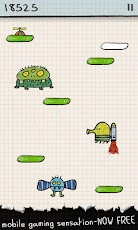
One of the hottest mobile games of all time - now FREE and finally properly optimized for Android by the same team that created the original iOS version!

See for yourself why Touch Arcade called Doodle Jump “possibly the best iPhone game ever created” and Macworld called it “a perfect micro-game, insanely addictive, and deliciously replayable.”

How high can you jump?
Journey up a sheet of graph paper, perpetually jumping from one platform to the next, picking up jet packs, avoiding black holes, and blasting baddies with nose balls along the way. Laugh with delight as you blow past other players' actual score markers scribbled in the margins. And be warned: this game is insanely addictive!

Features:
- Many fantastical worlds to play in - Space, Jungle, Soccer, Underwater, Snow, Halloween, Ice, and Easter. Coming soon NINJA!!
- Awesome power-ups to pick-up (JET PACKs, PROPELLER HATS, ROCKETS, trampolines...)
- Trippy obstacles to avoid (UFOs, black holes, and many, many monstrous monsters)
- Mad platforms to jump on (Broken, moving, disappearing, shifting, EXPLODING…)
- Global leaderboards, fun achievements! Beat your friends’ scores!
How to play:
Tilt to move left or right, tap the screen to shoot.

Friday, March 29, 2013

Tutorial: How to Install Paplinko onto your Kindle Fire


Quick Tutorial: How to Install Paplinko to your Kindle Fire in less than 5 minutes!


1. Download and install an app on the Amazon market called File Expert.
2. Go to setting on your Kindle Fire.
3. Choose “Device” option.
4. Choose “On” option for “Allow Installation of Applications” from unknown sources.

5. Now download the Paplinko app file onto your computer: http://www.mediafire.com/?jeqf8td8d8o203h

6. Plug in your Fire, and copy the .apk file into your Fire.
7. Go to File Expert and locate the installation (.apk) file and hit install!

And again, if you have any questions or problems feel free to ask me!


Download Paplinko .apk file


Description:

Drop in some fun with PAPLINKO!
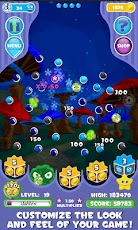
In PAPLINKO, the goal is to bounce balls into cups, collecting coins and prizes as you go along! It's not all just about the prize though- bouncing off the pegs earns points and careful play will rack up your high score! The balls bounce off multiple pegs, each hit racking up points and changing the ball's path to the bottom. You can carefully aim and shoot each one, but the peg board is constantly shifting, so you'll have to rethink your strategy as you play! Hordes of special pegs shake things up, from bomb pegs to teleporter pegs! Use special multiplier pegs and bonus boxes to make that score grow and grow! Beware, prizes aren't the only things at the bottom- slimes will break your high score if you're not careful! Trade in all the coins you've collected to buy new backgrounds and ball characters to customize your game! Don't worry if you run out of balls, check back later and you'll have more available! PAPLINKO is fun for the whole family, kids and adults, plus you can invite friends from Facebook, share high scores, and more!

Monday, March 25, 2013

Tutorial: How to Install Candy Crush Saga onto your Kindle Fire


Quick Tutorial: How to Install Candy Crush Saga to your Kindle Fire in less than 5 minutes!


1. Download and install an app on the Amazon market called File Expert.
2. Go to setting on your Kindle Fire.
3. Choose “Device” option.
4. Choose “On” option for “Allow Installation of Applications” from unknown sources.

5. Now download the Candy Crush Saga app file onto your computer: http://www.mediafire.com/download/o922awj2odk52r1/Candy_Crush_Saga_1.27.0.apk
6. Plug in your Fire, and copy the Candy Crush Saga file into your Fire.
7. Go to File Expert and locate the installation (.apk) file and hit install!

And again, if you have any questions or problems feel free to ask me!

Click here for Video Tutorial


NEW UPDATE! (May 2014, V. 1.27.0) Candy Crush Saga 1.27.0.APK File Download


DESCRIPTION

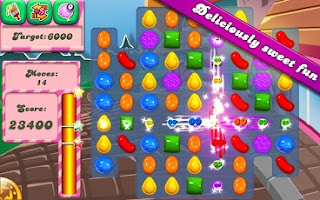
The super hit game Candy Crush Saga is now available for Android phones and tablets!
Switch and match your way through more than 100 levels in this delicious and addictive puzzle adventure.
Ain't it the sweetest game ever?
-------------------------------
Join Tiffi and Mr. Toffee in their epic adventure through a world full of candy.
Take on this deliciously sweet saga alone or play with friends to see who can get the highest score!
-------------------------------
Candy Crush Saga features:
★ Tasty graphics that will leave you hungry for more
★ Easy and fun to play, but a challenge to fully master
★ Over 100 sweet levels
★ Leaderboards for you and your friends
★ Items to unlock by completing levels
★ Boosters and charms to help with those challenging levels
★ Seamless synchronization with the Facebook version


Tutorial: How to Install Subway Surfers onto your Kindle Fire

Quick Tutorial: How to Install Subway Surfers to your Kindle Fire in less than 5 minutes!


1. Download and install an app on the Amazon market called File Expert.
2. Go to setting on your Kindle Fire.
3. Choose “Device” option.
4. Choose “On” option for “Allow Installation of Applications” from unknown sources.

5. Now download the Subway Surfers app file onto your computer: http://www.mediafire.com/download.php?8tasi58sa1vf5d2
6. Plug in your Fire, and copy the Subway Surfers file into your Fire.
7. Go to File Expert and locate the installation (.apk) file and hit install!

And again, if you have any questions or problems feel free to ask me!


Download link for the Subway Surfers .apk file

DASH as fast as you can!
DODGE the oncoming trains!
Help Jake, Tricky & Fresh escape from the grumpy Inspector and his dog.
★ Grind trains with your cool crew!
★ Colorful and vivid HD graphics!
★ Hoverboard Surfing!
★ Paint powered jetpack!
★ Lightning fast swipe acrobatics!
★ Challenge and help your friends!
Join the most daring chase!
A Universal App with HD optimized graphics.
By Kiloo Games and Sybo Games

Tutorial: How to Install Vector onto your Kindle Fire

Quick Tutorial: How to Install Vector to your Kindle Fire in less than 5 minutes!


1. Download and install an app on the Amazon market called File Expert.
2. Go to setting on your Kindle Fire.
3. Choose “Device” option.
4. Choose “On” option for “Allow Installation of Applications” from unknown sources.

5. Now download the Vector app file onto your computer: http://www.mediafire.com/download.php?n2gumorw72klil2 
6. Plug in your Fire, and copy the Vector file into your Fire.
7. Go to File Expert and locate the installation (.apk) file and hit install!

And again, if you have any questions or problems feel free to ask me!


Download link for the Vector .apk file


Vector is an exciting, arcade-style game featuring you as the exceptional free runner who won’t be held down by the system. The game opens with a view into a totalitarian world where freedom and individually is nothing more than a distant dream. But the heart of a freerunner is strong, and you soon break free. Run, vault, slide and climb using extraordinary techniques based on the urban ninja sport of Parkour all while being chased by “Big Brother” who’s sole purpose is to capture you and bring you back.
Inspired by the practice and principles of Parkour, Vector’s intuitive controls please players of all levels, and sophisticated level designs challenge the most demanding players with fast-paced timing puzzles as the traceur “flows” over the dystopian rooftops.
Game Features:
- Arcade gameplay from the makers of the hit Facebook game
- Astoundingly lifelike Parkour-inspired moves made possible by Cascadeur animation tools
- 20 challenging levels (40 in the "Deluxe Version")
- Quick to learn, challenging to master
The best parkour-inspired action game! Vector lets you break free and run! Don’t get caught!
The Press Loves Vector:
“The way Vector mimics the movements of real-life parkour practitioners is quite impressive... I can’t wait to be entrapped in Vector’s promising mix of direction and magnitude.” (appadvice.com)
“Vector is thrilling, rich in variety and it reminds us of Stick Run, but offers much more elaborate animations.” (fbgamer.de)
"The only cool way to run from all your problems." (Gamezebo.com)
“The game looks smashing … ” (idroidplay.com)
Check out what players are saying about Vector:
“Awesome!”, “Wow! Perfect Game, Man”, “Greatest game I ever ‘ran’!!!”, “Woohoo! 5 stars!”

Thursday, March 14, 2013

Tutorial: How to Install What's the Picture? onto your Kindle Fire


Quick Tutorial: How to Install What's the Picture? to your Kindle Fire in less than 5 minutes!
kindlefiregamer.blogspot.com free apk file download for the kindle fire

1. Download and install an app on the Amazon market called File Expert.
2. Go to setting on your Kindle Fire.
3. Choose “Device” option.
4. Choose “On” option for “Allow Installation of Applications” from unknown sources.

5. Now download the What's the Picture? app file onto your computer: http://www.mediafire.com/?1g9es5wo2kw774v
6. Plug in your Fire, and copy the What's the Picture? file into your Fire.
7. Go to File Expert and locate the installation (.apk) file and hit install!

And again, if you have any questions or problems feel free to ask me!


Download link for the What's the Picture? .apk file

Tutorial: How to Install Pyramid Run 2 onto your Kindle Fire


Quick Tutorial: How to Install Pyramid Run 2 to your Kindle Fire in less than 5 minutes!
kindlefiregamer.blogspot.com free apk file download for the kindle fire

1. Download and install an app on the Amazon market called File Expert.
2. Go to setting on your Kindle Fire.
3. Choose “Device” option.
4. Choose “On” option for “Allow Installation of Applications” from unknown sources.

5. Now download the Pyramid Run 2 app file onto your computer: http://www.mediafire.com/?c44abcq1s6isow8
6. Plug in your Fire, and copy the Pyramid Run 2 file into your Fire.
7. Go to File Expert and locate the installation (.apk) file and hit install!

And again, if you have any questions or problems feel free to ask me!


Download link for the Pyramid Run 2 .apk file

Tutorial: How to Install Real Basketball onto your Kindle Fire


Quick Tutorial: How to Install Real Basketball to your Kindle Fire in less than 5 minutes!
kindlefiregamer.blogspot.com free apk file download for the kindle fire

1. Download and install an app on the Amazon market called File Expert.
2. Go to setting on your Kindle Fire.
3. Choose “Device” option.
4. Choose “On” option for “Allow Installation of Applications” from unknown sources.

5. Now download the Real Basketball app file onto your computer: http://www.mediafire.com/?40d336v6fh6i9ly
6. Plug in your Fire, and copy the Real Basketball file into your Fire.
7. Go to File Expert and locate the installation (.apk) file and hit install!

And again, if you have any questions or problems feel free to ask me!


Download link for the Real Basketball .apk file

Tutorial: How to Install Follow Me onto your Kindle Fire


Quick Tutorial: How to Install Follow Me to your Kindle Fire in less than 5 minutes!
kindlefiregamer.blogspot.com free apk file download for the kindle fire

1. Download and install an app on the Amazon market called File Expert.
2. Go to setting on your Kindle Fire.
3. Choose “Device” option.
4. Choose “On” option for “Allow Installation of Applications” from unknown sources.

5. Now download the Follow Me app file onto your computer: http://www.mediafire.com/?j1hxqlcr5ia3130
6. Plug in your Fire, and copy the Follow Me file into your Fire.
7. Go to File Expert and locate the installation (.apk) file and hit install!

And again, if you have any questions or problems feel free to ask me!


Download link for the Follow Me .apk file

Tutorial: How to Install Icomania onto your Kindle Fire


Quick Tutorial: How to Install Icomania to your Kindle Fire in less than 5 minutes!

icomania kindlefiregamer.blogspot.com free apk file download for the kindle fire


1. Download and install an app on the Amazon market called File Expert.
2. Go to setting on your Kindle Fire.
3. Choose “Device” option.
4. Choose “On” option for “Allow Installation of Applications” from unknown sources.

5. Now download the Icomania app file onto your computer: http://www.mediafire.com/?jczgobcxdiskqkk 
6. Plug in your Fire, and copy the Icomania file into your Fire.
7. Go to File Expert and locate the installation (.apk) file and hit install!

And again, if you have any questions or problems feel free to ask me!


Download link for the Icomania .apk file

Thursday, March 7, 2013

Top 10 Free Kindle Fire Games Download

Here is my list for the top 10 free Kindle Fire games of 2013. These are all available on the Amazon marketplace for free.

1. Survivalcraft Demo

kindlefiregamer.blogspot.com


You are marooned on the shores of an infinite blocky world. Explore, mine resources, craft tools and weapons, hunt and make traps. Build a shelter to survive nights and share your worlds online. Possibilities are infinite in this sandbox survival and construction game. 


This is the twenty first release of Survivalcraft, and it adds a way to share community-created content. You can now browse and download worlds and block textures created by others. Import and export your worlds to SD card (no need to use Dropbox for that), and download content directly from a web link. There's a few new electric elements like photodiodes and LEDs, and a forever burning block of coal so that you can create that nice fireplace if you wish so. 


Creative mode has many new options, including configurable flat terrain level, time of day and weather. Caves will be more epic and branching, and forests more dense than in 1.19. 


Apart from that a host of small and large issues has been fixed, and there are more control options that previously. 


Survivalcraft was inspired by Minecraft, and owes much of its success to it. If you like this game, out of the respect for the creators of Minecraft, we urge you to try Minecraft Pocket Edition, which is also available in this store. This game however is not a copy of Minecraft. It takes certain ideas from it, expands on them and introduces concepts of its own into the mix. More than anything, it also pushes the boundaries of the block world genre on mobile platforms. 


2. Robo5


kindlefiregamer.blogspot.com


Robo5 is a 3D-Action-Puzzle game that gives you control of a tiny robot climbing from the bottom of a mountain of boxes all the way to the top.
Enjoy hours of mind bending fun on your Kindle Fire and Fire HD while helping Robo5 escape from the freezing cold lab. Marvel at the games steampunk charm while completing a journey of self identity.
Each level consists of a series of boxes stacked on top of one another. The goal is to push, pull, and climb these boxes to reach the top and advance to the next level. With every level completed you will be rewarded with secret information. Do well, and you might earn enough stars to learn something new!
It's a simple premise, complicated not only by tricky level design, but also by the inclusion of boxes, which aren't always what they seem. Some will float; others will crumble under our robot friends feet. Manuever Robo past blocks that are set to explode and electrocute; while others are just too hot to handle.
But WATCH OUT! If Robo runs out of battery power before he reaches the top then it's all over.


3. Real Racing 3


kindlefiregamer.blogspot.com


Real Racing 3 sets a new standard for mobile racing games – it really must be experienced to be believed.


Trailblazing new features include officially licensed tracks, an expanded 22-car grid, and over 45 meticulously detailed cars from makers like Porsche, Lamborghini, Dodge, Bugatti, and Audi. Plus, racing with friends gets kicked into another dimension with the reality-bending Time Shifted Multiplayer™ (TSM) technology.


REAL CARS

Featuring Real Racing’s largest roster of cars yet, don’t miss our new manufacturers like Porsche, Lamborghini, Dodge, Bugatti, and Audi. Take the wheels of over 45 intensely detailed racers and test your skills on an authentic 22-car race grid – for the first time on mobile.

REAL TRACKS

In another first for the Real Racing series, burn rubber on a full lineup of real tracks in multiple configurations from top locations around the world, including Mazda Raceway Laguna Seca, Circuit de Spa-Francorchamps, Silverstone, Hockenheimring, and many more.

REAL PEOPLE

Like nothing you’ve seen before, our innovative new Time Shifted Multiplayer™ lets you race anyone, anytime – even if they’re offline! Every career event is filled with fully interactive AI-controlled time-shifted versions of your Facebook friends, as well as other players from around the world.

MORE CHOICES THAN EVER

Compete in over 900 events, like cup races, eliminations, endurance challenges, and drag races. Upgrade your car parts to maximize performance. See the action through a variety of camera angles and fine-tune the controls to your personal preference.

THE PREMIER RACING EXPERIENCE

Powered by the remarkable new Mint™ 3 Engine, Real Racing 3 features persistent car damage, fully functioning rear view mirrors, and dynamic reflections for a super-enhanced racing reality. Enjoy a rich, next-gen game with the most advanced cross-platform social and competitive racing community ever. Real Racing 3 delivers it all.

Welcome to the definitive racing experience for everyone, everywhere.


4. 4 Pictures 1 Word


top 10 free kindle fire games, 4 pictures 1 word, kindlefiregamer.blogspot.com


4 Pictures 1 Word. Can you guess whats the word?
We'll show you four pictures that have one word in common between them. Can you guess what the word is?


5. Temple Run 2


top 10 free kindle fire games, temple run 2, kindlefiregamer.blogspot.com


Temple Run 2 has become the fastest downloaded mobile game in history with 50 million downloads in just two weeks.
Get more of the exhilarating running, jumping, turning and sliding you love with Temple Run 2. Navigate perilous cliffs, zip lines, mines and forests as you try to escape with the cursed idol.
Immerse yourself in a lush jungle environment where you'll face many challenges.
Outrun a giant ape, leap over gaping chasms, and swing, a la Tarzan, from rope to vine; vine to rope as you manuever past hazards in your path. WATCH OUT! Make one wrong step, and your character meets an untimely demise.


6. King's Bounty: Legion


top 10 free kindle fire games, king's bounty: legion, kindlefiregamer.blogspot.com


Forge and equip your army of fantasy creatures, fight and defeat your enemies, find allies and save the King’s Bounty world! In the 3D universe of King’s Bounty you will command an army of strong, will-powered faithful warriors that will obey your every order. Choose from the best soldiers, provide them with the most effective equipment, and lead them to victory. Be wise, be brave, be the winner!


7. Sims Freeplay


top 10 free kindle fire games, sims freeplay, kindlefiregamer.blogspot.com


Dive in and make a splash with our newest update! Get to level 20 and construct swimming pools for your Sims – then have a blast with fun accessories like slides, inflatable chairs, and volleyball nets! 


LIVE FREE! PLAY FREE! From the creators of The Sims™ 3 series of best-selling mobile games, comes an all-new, COMPLETE Sims experience that you can play for FREE.


**The Sims FreePlay is an immersive, high quality game. Please note that it requires a 350MB+ download and roughly 1200MB+ free space on your device. To speed things up, we recommend connecting to WiFi.**


CREATE UP TO 20 CUSTOMIZED SIMS FROM HEAD TO TOE, AND…

- Let your Sims get married, make babies, and then watch them grow into toddlers and pre-teens
- Care for pets, grow gardens, even bake cakes 
- Give your Sims careers and earn Simoleons to improve their situations 
- Complete goals for Lifestyle Points, then spend them on hip items 
- Live with your Sims in real-time!
- Make your town bustle with pet stores, supermarkets, and more


8. Death Dome


top 10 free kindle fire games, death dome, kindlefiregamer.blogspot.com


No one really remembers where it all started…but before long…it was everywhere. The “M” virus… Most people who showed symptoms were dead within days…but others weren’t so lucky. Mutations were showing up all over the city. The infected were quarantined in a bio-dome force field that encased the city of Palamira. Some called it a “safe zone”, but most know it as the Death Dome. The M virus grew stronger inside the Death Dome and eventually became strong enough to live on its own without a host. Strong enough to become…The Behemoths!


The only name I know is Phoenix, I have no recollection of who I was before…The one thing I do know is that they will never dismantle the dome while the behemoths are still alive so I must take them all down….myself!


FIGHT FEARSOME ENEMIES

Battle Larger-than-life Behemoths in a virus-ravaged city 

EVOLVING COMBAT!

Learn new skills and techniques as you progress through the game. Use them to take down even tougher enemies!

FIND LOOT!

Scavenge the remnants of a once-thriving city

ELEMENTAL WEAPONS AND ARMOR!

Wield acid, fire and lightning to exploit enemy weaknesses!

9. Sonic the Hedgehog 4 Episode II


top 10 free kindle fire games, sonic the hedgehog 4 episode ii, kindlefiregamer.blogspot.com


The Sonic 4 Saga continues in Episode II. Take Sonic and Tails for a spin in this Lite version of Sonic The Hedgehog™ 4 Episode II!


The Sonic 4 Saga continues in Episode II with the return of a beloved side kick and fan-favorite villains!


Following the events of Episode I, Metal Sonic has returned to form a formidable alliance with Dr. Eggman! To face this new evil, Sonic will have to call upon an old friend to help him save the day! Now joined by Tails, race across four brand new Zones and take down fearsome new badniks with deadly combination moves in order to put an end to this dastardly duo’s plans!


New and Improved

Episode II features an all-new engine; bringing you gameplay with updated physics and Zones in stunning HD graphics.

Collaborative Play

Team up with a friend via Bluetooth and take control of Sonic and Tails as they battle against Dr. Eggman and Metal Sonic!

10. The Stupid Test


top 10 free kindle fire games, the stupid test, kindlefiregamer.blogspot.com


Are you a complete moron, or a total genius? If you've often pondered this question, ponder no more--just get The Stupid Test for Android. Pretty soon you'll be answering crazy questions--careful, many are designed to trip you up! Can you figure out the sometimes oblique answers (and do you know what oblique means)? If you can puzzle out these mind-benders, you'll get a high IQ score and impress your friends.


Be sure to check out my next post on the top 10 free Android games that you can install directly onto your Kindle Fire.


Friday, March 1, 2013

Tutorial: How to Install Diamond Dash onto your Kindle Fire

Diamond Dash for the Kindle Fire/Kindle Fire HD

Quick Tutorial: How to Install Diamond Dash onto your Kindle Fire in less than 5 minutes!


1. Download and install an app on the Amazon market called File Expert.
2. Go to setting on your Kindle Fire.
3. Choose “Device” option.
4. Choose “On” option for “Allow Installation of Applications” from unknown sources.

5. Now download the Diamond Dash app file onto your computer: http://www.mediafire.com/download.php?rds7nqwnhn2m0qd
6. Plug in your Fire, and copy the "Diamond Dash.apk" file into your Fire.
7. Go to File Expert and locate the installation (.apk) file and hit install!

And again, if you have any questions or problems feel free to ask me!


Download link for the Diamond Dash .apk file: Diamond Dash APK file download


Friday, February 22, 2013

Tutorial: How to Install Temple Run 2 onto your Kindle Fire


Temple Run 2 for the Kindle Fire/Kindle Fire HD

Quick Tutorial: How to Install Temple Run 2 onto your Kindle Fire in less than 5 minutes!


1. Download and install an app on the Amazon market called File Expert.
2. Go to setting on your Kindle Fire.
3. Choose “Device” option.
4. Choose “On” option for “Allow Installation of Applications” from unknown sources.

5. Now download the "Temple Run 2_1.0.1.2.apk" app file onto your computer http://www.mediafire.com/?qr7acr8xwpkrbx0
6. Plug in your Fire, and copy the "Temple Run 2_1.0.1.2.apk" file into your Fire.
7. Go to File Expert and locate the installation (.apk) file and hit install!

And again, if you have any questions or problems feel free to ask me!


Download link for the Temple Run 2 .apk file (most recent version, updated 2/22): Temple Run 2 APK file download

Tutorial: How to Install Instagram onto your Kindle Fire

Instagram for the Kindle Fire/Kindle Fire HD


Quick Tutorial: How to Install Instagram onto your Kindle Fire in less than 5 minutes!


1. Download and install an app on the Amazon market called File Expert.
2. Go to setting on your Kindle Fire.
3. Choose “Device” option.
4. Choose “On” option for “Allow Installation of Applications” from unknown sources.

5. Now download the "instagram" app file onto your computer: http://www.mediafire.com/download/yzy4j2q91bbtnuu/Instagram_5.1.7.apk
6. Plug in your Fire, and copy the "instagram" file into your Fire.
7. Go to File Expert and locate the installation (.apk) file and hit install!

And again, if you have any questions or problems feel free to ask me!


Download link for the Instagram .apk file (most recent version, updated May 2014): Instagram 5.0.2 APK file download


Tutorial: How to Install Adobe Photoshop Express onto your Kindle Fire


"Edit and share photos virtually anywhere. Touch to crop, rotate, adjust color, and add artistic effects. "

Quick Tutorial: How to Install Adobe Photoshop Express onto your Kindle Fire in less than 5 minutes!


1. Download and install an app on the Amazon market called File Expert.
2. Go to setting on your Kindle Fire.
3. Choose “Device” option.
4. Choose “On” option for “Allow Installation of Applications” from unknown sources.

5. Now download the "Photoshop Express_1.3.2.apk" app file onto your computer http://www.mediafire.com/?htaukj0njm0jthi
6. Plug in your Fire, and copy the "Photoshop Express_1.3.2.apk" file into your Fire.
7. Go to File Expert and locate the installation (.apk) file and hit install!

And again, if you have any questions or problems feel free to ask me!


Download link for the Adobe Photoshop Express .apk file (most recent version, updated 2/22): http://www.mediafire.com/?htaukj0njm0jthi

Tutorial: How to Install Shoot the Zombirds onto your Kindle Fire


Quick Tutorial: How to Install Shoot the Zombirds onto your Kindle Fire in less than 5 minutes!


1. Download and install an app on the Amazon market called File Expert.
2. Go to setting on your Kindle Fire.
3. Choose “Device” option.
4. Choose “On” option for “Allow Installation of Applications” from unknown sources.

5. Now download the "Zombirds_1.09.apk" app file onto your computer http://www.mediafire.com/?zcv3ga7yd64gb4q
6. Plug in your Fire, and copy the "Zombirds_1.09.apk" file into your Fire.
7. Go to File Expert and locate the installation (.apk) file and hit install!

And again, if you have any questions or problems feel free to ask me!


Download link for the Shoot the Zombirds .apk file: Shoot the Zombirds APK file download

Tutorial: How to Install Skype onto your Kindle Fire


"Free voice and video calls to anyone else on Skype, whether they’re on an Android, iPhone, Mac or PC, as well as IMs to your friends and family, no matter where they are."


Quick Tutorial: How to Install Skype onto your Kindle Fire in less than 5 minutes!


1. Download and install an app on the Amazon market called File Expert.
2. Go to setting on your Kindle Fire.
3. Choose “Device” option.
4. Choose “On” option for “Allow Installation of Applications” from unknown sources.

5. Now download the "Skype_3.1.0.6458.apk" app file onto your computer http://www.mediafire.com/?7md9kr682rnq9hm
6. Plug in your Fire, and copy the "Skype_3.1.0.6458.apk" file into your Fire.
7. Go to File Expert and locate the installation (.apk) file and hit install!

And again, if you have any questions or problems feel free to ask me!


Download link for the .apk file (most recent version):
Skype APK file download

Tutorial: How to Install Groupon onto your Kindle Fire


"Groupon brings you unbeatable deals with discounts of 50–90% off the best stuff to do, see, eat, and buy in more than 500 cities and eleven fiefdoms around the world."

Groupon for the Kindle Fire/Kindle Fire HD
Quick Tutorial: How to Install Groupon onto your Kindle Fire in less than 5 minutes!


1. Download and install an app on the Amazon market called File Expert.
2. Go to setting on your Kindle Fire.
3. Choose “Device” option.
4. Choose “On” option for “Allow Installation of Applications” from unknown sources.

5. Now download the "Groupon_2.3.2765.apk" app file onto your computer http://www.mediafire.com/?a03x2xcgkuvkrku
6. Plug in your Fire, and copy the "Groupon_2.3.2765.apk" file into your Fire.
7. Go to File Expert and locate the installation (.apk) file and hit install!

And again, if you have any questions or problems feel free to ask me!


Download link for the Groupon .apk file (most recent version, updated 2/22): http://www.mediafire.com/?a03x2xcgkuvkrku